Latest release (January 2026)
The release of GroupDocs.Signature version 26.1 adds new features and enhancements.
Full list of changes in this release
| Key | Category | Summary |
|---|---|---|
| SIGNATURENET-5528 | ★ Feature | Image digital signature support and validation |
| SIGNATURENET-5445 | ★ Feature | Adaptive rendering for Barcode and QR Code signature previews |
| SIGNATURENET-5479 | ★ Feature | Support for rotation in Barcode and QR Code previews |
| SIGNATURENET-5478 | ★ Feature | Support for APNG and TGA image formats |
| SIGNATURENET-5500 | ⚙️ Enhancement | LINQ queries optimization for signature operations |
| SIGNATURENET-5480 | ⚙️ Enhancement | Added background transparency support for Barcode/QR previews |
| SIGNATURENET-5477 | ⚙️ Enhancement | Overlay image support for digital signatures with background |
| SIGNATURENET-5422 | ⚙️ Enhancement | Removed insecure encryption algorithms (RC2, AES, DES, TripleDES) |
| SIGNATURENET-5555 | 🐛 Bug Fix | Fixed GeneratePreview() type initializer exception with DOC format on Linux |
Major Features
Image digital signature support and validation
🌐 This release introduces comprehensive support for embedding digital signatures directly into raster images using steganography (LSB - Least Significant Bit technique). This method embeds signature data invisibly into image pixels, making the signature undetectable to the naked eye while maintaining image quality. The feature supports signing and verifying PNG and JPG image formats with password protection.
Key benefits for developers:
- Invisible signatures: Signatures are embedded directly into image pixels using steganography, preserving image quality
- Password protection: Signatures are protected with a password (minimum 4 characters) for security
- Format support: Works with PNG and JPG image formats
- Full validation support: Verify embedded signatures using password-based authentication with configurable detection thresholds
- Stream support: Can sign and verify images from streams or file paths
How it works:
The signature data is embedded into the least significant bits of image pixels. Changes to LSBs are imperceptible to the human eye, ensuring the image quality remains virtually unchanged while providing cryptographic security.
Signing an image:
import groupdocs.signature as gs
import groupdocs.signature.options as gso

input_file = "image.png"
output_file = "signed_image.png"
password = "MySecurePassword123"

# Sign the image
with gs.Signature(input_file) as signature:
    sign_options = gso.ImageDigitalSignOptions()
    sign_options.password = password

    sign_result = signature.sign(output_file, sign_options)

    if sign_result.succeeded and len(sign_result.succeeded) > 0:
        print("Image signed successfully!")
        print(f"Signatures added: {len(sign_result.succeeded)}")
Verifying a signed image:
import groupdocs.signature as gs
import groupdocs.signature.options as gso

signed_file = "signed_image.png"
password = "MySecurePassword123"

# Verify the signed image
with gs.Signature(signed_file) as signature:
    verify_options = gso.ImageDigitalVerifyOptions()
    verify_options.password = password
    verify_options.detection_threshold_percent = 75  # Optional: detection threshold (0-100%)

    verify_result = signature.verify(verify_options)

    if verify_result.is_valid:
        print("Digital signature is valid!")
        print(f"Verified signatures: {len(verify_result.succeeded)}")
    else:
        print("Digital signature is invalid or not found.")
Advanced verification with full data extraction:
with gs.Signature("signed_image.png") as signature:
    verify_options = gso.ImageDigitalVerifyOptions()
    verify_options.password = "MySecurePassword123"
    verify_options.use_full_data_extraction = True  # Enable full extraction for maximum accuracy
    verify_options.detection_threshold_percent = 85

    verify_result = signature.verify(verify_options)

    if verify_result.is_valid and verify_options.detected_probability is not None:
        print(f"Signature detected with {verify_options.detected_probability}% probability")
Requirements:
- Image size: Minimum 8x8 pixels, minimum 16,384 total pixels
- Password: Minimum 4 characters (case-sensitive)
- Supported formats: PNG and JPG/JPEG
Adaptive rendering for Barcode and QR Code signature previews
🌐 In previous versions, the size of Barcode and QR Code signature previews was fixed or automatically calculated, which could result in inconsistent appearance across different documents or formats.
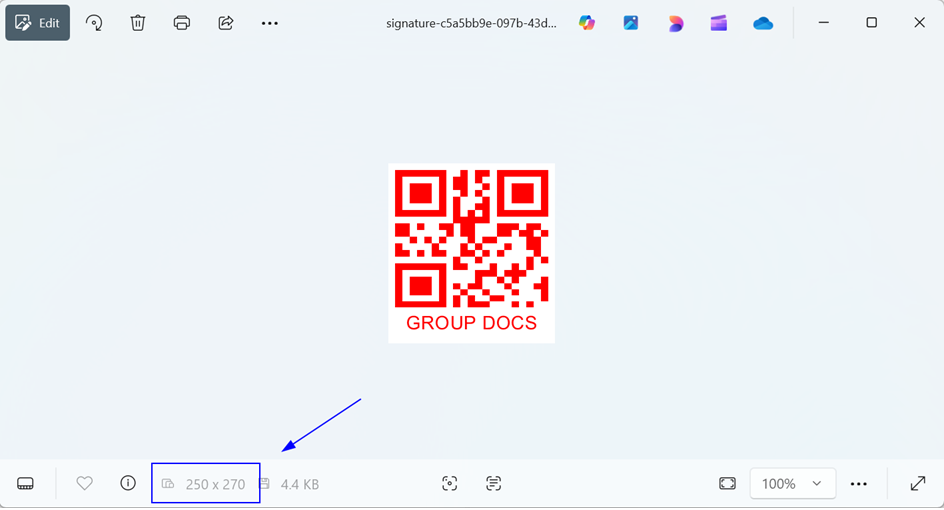
In this release, we introduced adaptive rendering that gives users full control over the size of the signature preview. Now users can explicitly specify the desired width and height for Barcode and QR Code previews to ensure consistent layout and appearance regardless of target format or resolution.
import groupdocs.signature as gs
import groupdocs.signature.options as gso

# Initialize QR Code signing options
qr_sign_options = gso.QrCodeSignOptions("GROUP DOCS", gs.QrCodeTypes.QR)
qr_sign_options.width = 250                          # Width of the QR code
qr_sign_options.height = 270                         # Height of the QR code
qr_sign_options.fore_color = gs.Color.red            # Color of the QR code
qr_sign_options.code_text_alignment = gs.CodeTextAlignment.BELOW  # Text alignment relative to the QR code
qr_sign_options.text = "GROUP DOCS"                  # Text displayed below the QR code

# Configure preview generation options for the QR code signature
preview_options = gso.PreviewSignatureOptions(
    qr_sign_options,
    create_signature_stream,   # Delegate to create the stream
    release_signature_stream   # Delegate to release the stream
)
preview_options.signature_id = str(uuid.uuid4())     # Unique identifier for the preview
preview_options.preview_format = gso.PreviewSignatureOptions.PreviewFormats.PNG  # Output format of preview

# Generate the signature preview image
gs.Signature.generate_signature_preview(preview_options)
The following image shows the result:
Support for rotation in Barcode and QR Code previews
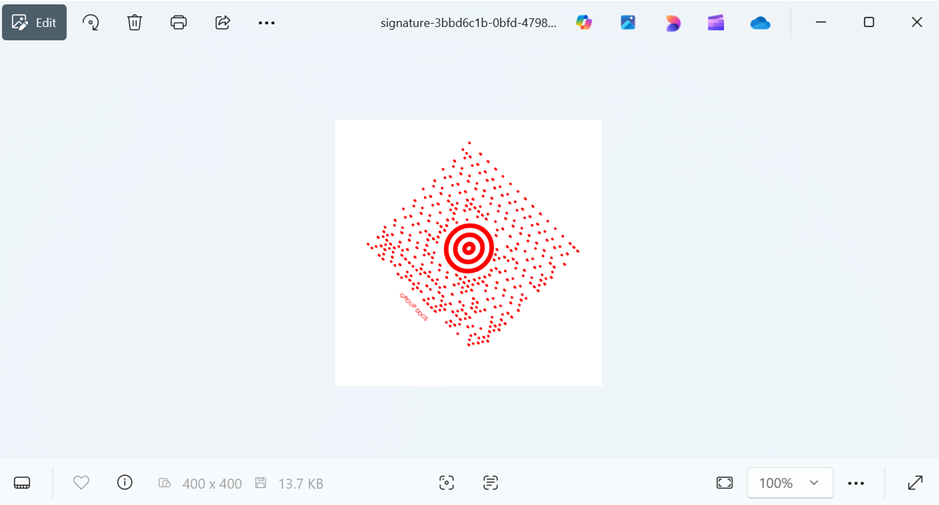
🌐 Rotation is now supported for Barcode and QR Code signature previews. Users can specify a rotation angle (in degrees), and the preview will reflect the exact appearance of the rotated signature. This feature improves flexibility when placing barcodes diagonally or vertically for layout purposes.
import groupdocs.signature as gs
import groupdocs.signature.options as gso

# Initialize barcode signing options with MaxiCode type
barcode_sign_options = gso.BarcodeSignOptions("GROUP DOCS", gs.BarcodeTypes.MaxiCode)
barcode_sign_options.width = 400                               # Width of the barcode
barcode_sign_options.height = 400                              # Height of the barcode
barcode_sign_options.fore_color = gs.Color.red                  # Foreground color of the barcode
barcode_sign_options.code_text_alignment = gs.CodeTextAlignment.BELOW  # Position of the text relative to the barcode
barcode_sign_options.text = "GROUP DOCS"                       # Text displayed with the barcode
barcode_sign_options.rotation_angle = 45                       # Rotate the barcode by 45 degrees

# Configure preview generation options for the barcode signature
preview_options = gso.PreviewSignatureOptions(
    barcode_sign_options,
    create_signature_stream,   # Delegate to create the output stream
    release_signature_stream   # Delegate to release the output stream
)
preview_options.signature_id = str(uuid.uuid4())               # Unique identifier for the signature preview
preview_options.preview_format = gso.PreviewSignatureOptions.PreviewFormats.PNG  # Output preview format

# Generate the barcode signature preview image
gs.Signature.generate_signature_preview(preview_options)
The following image shows the result:
Support for APNG and TGA image formats
🌐 Added full support for APNG (Animated PNG) and TGA (Targa) image formats when working with image-based signatures. Users can now use these formats for inserting, previewing, and processing image signatures. This enhancement extends compatibility with legacy and animated graphics workflows.
Added background transparency support for Barcode/QR previews
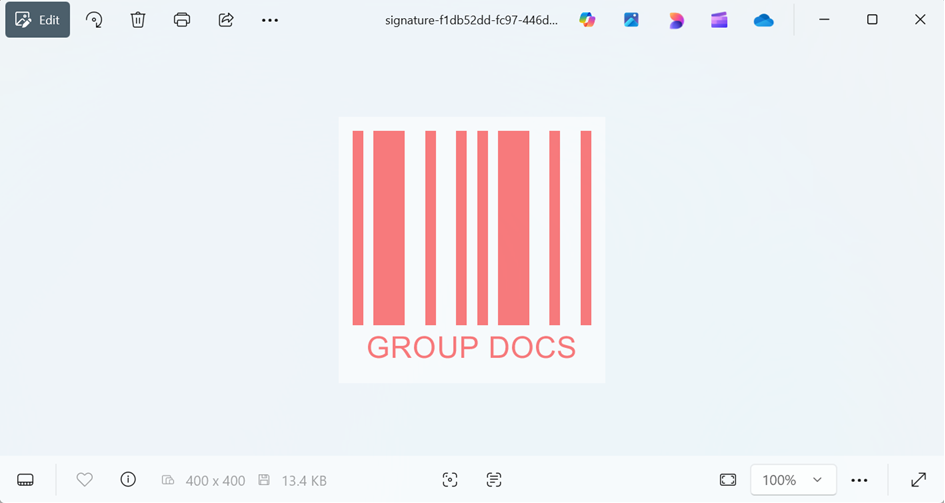
🌐 Previously, Barcode and QR Code previews did not respect background transparency settings. This release introduces support for transparent backgrounds in preview rendering. When users enable background transparency, the barcode or QR is rendered over a transparent canvas, making it easier to blend seamlessly into documents, especially PDFs and PNGs.
import groupdocs.signature as gs
import groupdocs.signature.options as gso

# Initialize barcode signing options with Codabar type
barcode_sign_options = gso.BarcodeSignOptions("GROUP DOCS", gs.BarcodeTypes.Codabar)
barcode_sign_options.width = 400                               # Width of the barcode preview
barcode_sign_options.height = 400                              # Height of the barcode preview
barcode_sign_options.fore_color = gs.Color.red                 # Foreground color of the barcode bars
barcode_sign_options.code_text_alignment = gs.CodeTextAlignment.BELOW  # Position text below the barcode
barcode_sign_options.text = "GROUP DOCS"                       # Text displayed with the barcode
barcode_sign_options.transparency = 0.5                         # Set barcode background transparency (50%)

# Configure preview generation options for the barcode signature
preview_options = gso.PreviewSignatureOptions(
    barcode_sign_options,
    create_signature_stream,                     # Delegate to create the output stream
    release_signature_stream                     # Delegate to release the output stream
)
preview_options.signature_id = str(uuid.uuid4())               # Unique identifier for this signature preview
preview_options.preview_format = gso.PreviewSignatureOptions.PreviewFormats.PNG  # Output preview format

# Generate the barcode signature preview image
gs.Signature.generate_signature_preview(preview_options)
The following image shows the result:
Overlay image support for digital signatures with background
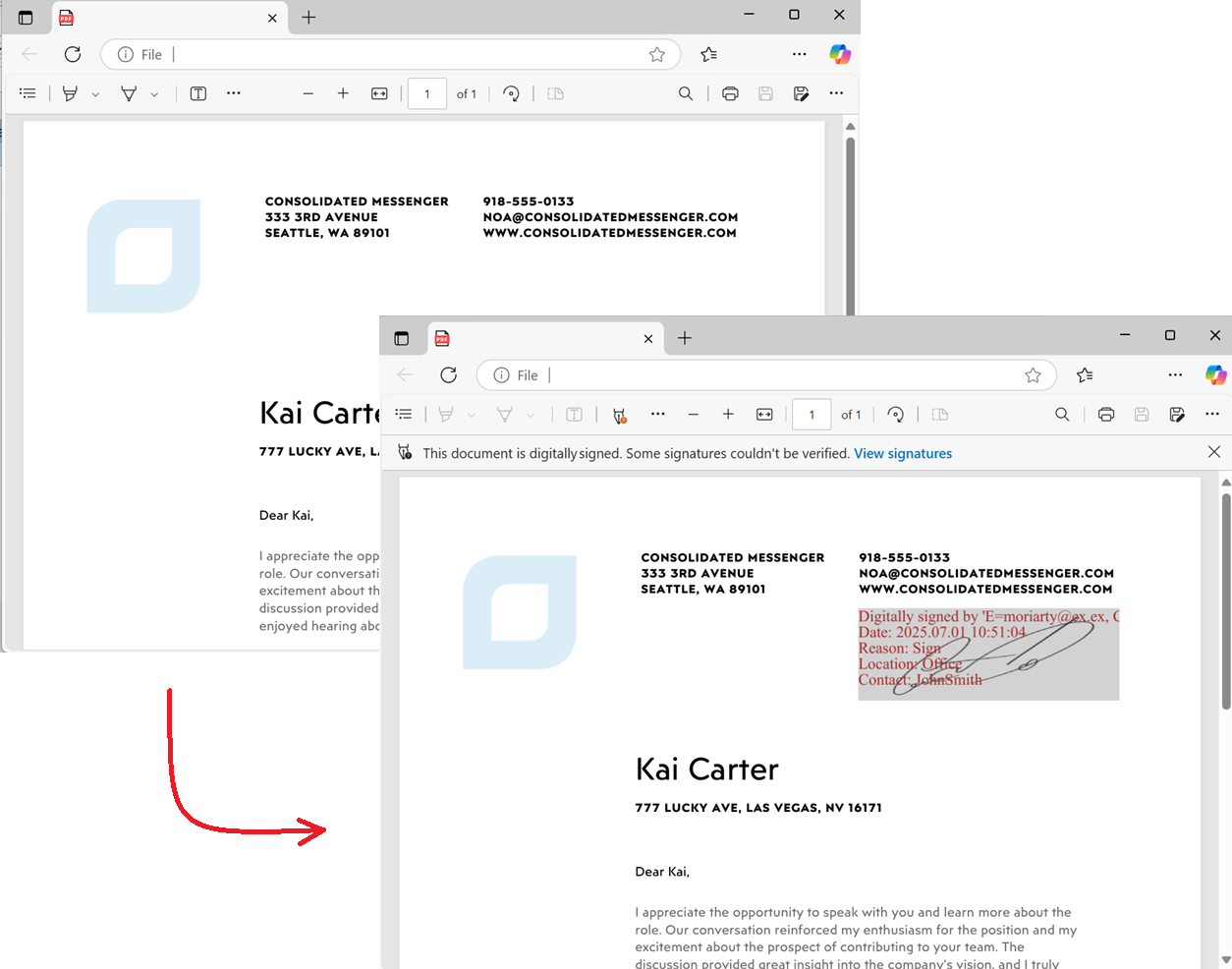
🌐 We have enhanced the PdfDigitalSignatureAppearance feature by allowing users to display overlay images (e.g., company logos or seals) together with text and background color settings — without the background color hiding the image.
Previously, setting a background color would obscure the signature image. With this release, you can now:
- Apply a background color while keeping the logo/image fully visible.
- Choose whether the image should appear in the foreground or background relative to the signature text.
- Use the new
SignatureCustomAppearance.IsForegroundImageproperty to control layering.
Example use case:
Many users prefer to highlight their brand logo or stamp prominently in a signature. The new setting allows placing the image in the foreground, with text behind it, creating a more customized and professional signature appearance.
import groupdocs.signature as gs
import groupdocs.signature.options as gso

signature_image_path = "signature.png"
certificate_path = "JohnSmithCertificate.pfx"

input_pdf = "SampleDocument.pdf"
output_pdf = "SignedDocument.pdf"

with gs.Signature(input_pdf) as signature:
    sign_options = gso.DigitalSignOptions(certificate_path)
    sign_options.password = "1234567890"             # Certificate password
    sign_options.reason = "Document approval"       # Reason for signing
    sign_options.contact = "John Smith"              # Contact info
    sign_options.location = "Head Office"            # Signing location

    sign_options.visible = True                      # Make signature visible on PDF
    sign_options.left = 350                         # X coordinate of signature position
    sign_options.top = 100                          # Y coordinate of signature position
    sign_options.width = 200                       # Signature width
    sign_options.height = 70                        # Signature height

    sign_options.image_file_path = signature_image_path  # Image to show inside signature

    appearance = gso.PdfDigitalSignatureAppearance()
    appearance.foreground = gs.Color.from_argb(50, gs.Color.brown)    # Semi-transparent font color
    appearance.font_family_name = "Times New Roman"                   # Font family
    appearance.font_size = 12                                          # Font size
    appearance.background = gs.Color.from_argb(50, gs.Color.light_gray)  # Semi-transparent background
    appearance.is_foreground_image = True                              # Image appears on top of text

    sign_options.appearance = appearance

    sign_result = signature.sign(output_pdf, sign_options)

    print(f"\nDocument signed successfully with {len(sign_result.succeeded)} signature(s).")
    print(f"Signed file saved at: {output_pdf}")
The following image shows the result:
Removed insecure encryption algorithms (RC2, AES, DES, TripleDES)
🌐 Deprecated and insecure encryption algorithms — RC2, DES, TripleDES, and weak AES modes — have been removed to comply with modern cryptographic security standards. Only secure algorithms are now supported. This change strengthens the default security of signed documents and aligns with OWASP and NIST recommendations.
LINQ queries optimization for signature operations
🌐 We’ve analyzed and refactored LINQ queries used throughout signature operations to improve performance, reduce memory allocation, and enhance overall efficiency. This optimization includes enhanced support for predicate-based filtering in Search and Verify methods, allowing developers to filter signatures more efficiently before processing.
Performance improvements:
- Reduced memory footprint: Optimized LINQ queries now use more efficient memory patterns, reducing garbage collection pressure.
- Faster signature processing: Improved query execution times, especially noticeable when working with documents containing multiple signatures.
- Better scalability: Enhanced performance when processing large batches of documents or documents with many signatures.
- Predicate-based filtering: Signatures are filtered before verification, skipping unnecessary operations and improving performance.
What this means for developers:
- Predicate functions for Search: Filter signatures during search operations using lambda expressions
- Predicate functions for Verify: Filter signatures before verification to optimize performance
- Better performance: Filtering happens before expensive operations, reducing processing time
- More flexible: Apply custom filtering criteria based on any signature property
Search with predicate example:
import groupdocs.signature as gs
import groupdocs.signature.options as gso
import groupdocs.signature.domain as gsd

with gs.Signature("document.pdf") as signature:
    # Search for text signatures and filter by content
    search_options = [gso.TextSearchOptions()]

    # Filter to only signatures containing "Approved"
    result = signature.search(search_options,
        lambda sig: isinstance(sig, gsd.TextSignature) and "Approved" in sig.text)

    for sig in result.signatures:
        print(f"Found: {sig.text}")
Verify with predicate example:
with gs.Signature("signed_document.pdf") as signature:
    verify_options = gso.TextVerifyOptions("John Smith")

    # Verify only signatures on page 1 (filtering happens before verification)
    result = signature.verify(verify_options,
        lambda sig: sig.page_number == 1)

    print(f"Found {len(result)} verified signatures on page 1")
Affected operations:
- Signature search and filtering operations with predicate functions
- Signature verification workflows with predicate functions
- Document processing with multiple signatures
- Batch signature operations
Fixed GeneratePreview() type initializer exception with DOC format on Linux
🐛 Fixed a critical issue where calling GeneratePreview() with DOC (Microsoft Word) format documents would throw a TypeInitializerException when running on Linux systems.
Upgrade Instructions
To leverage these improvements, update your package reference to version 26.1:
pip install --upgrade groupdocs-signature-net